

Best Video Editing Software 2026: Free & Professional Video Editors
Aaj ke time mein video banana sirf camera se recording karne tak limited nahi hai. YouTube videos, Instagram Reels, YouTube Shorts, wedding videos, cinematic projects aur business content ke liye ek achha video editing software bahut important hai.
Lekin market mein itne saare video editors available hain ki beginners ke liye sahi software choose karna difficult ho sakta hai.
Is guide mein hum best video editing software 2026, free video editors, professional editing software, YouTube editing tools aur beginners ke liye easy video editors ke baare mein simple language mein samjhenge.
Best Video Editing Software Kaun Sa Hai?
Har creator ke liye ek hi software perfect nahi hota.
Agar aap short videos, Reels aur Shorts banana chahte hain, to simple aur fast editor useful ho sakta hai.
Agar aap professional YouTube videos, wedding films, documentaries ya cinematic projects edit karte hain, to advanced timeline, audio, color correction aur visual-effects tools zyada important ho jate hain.
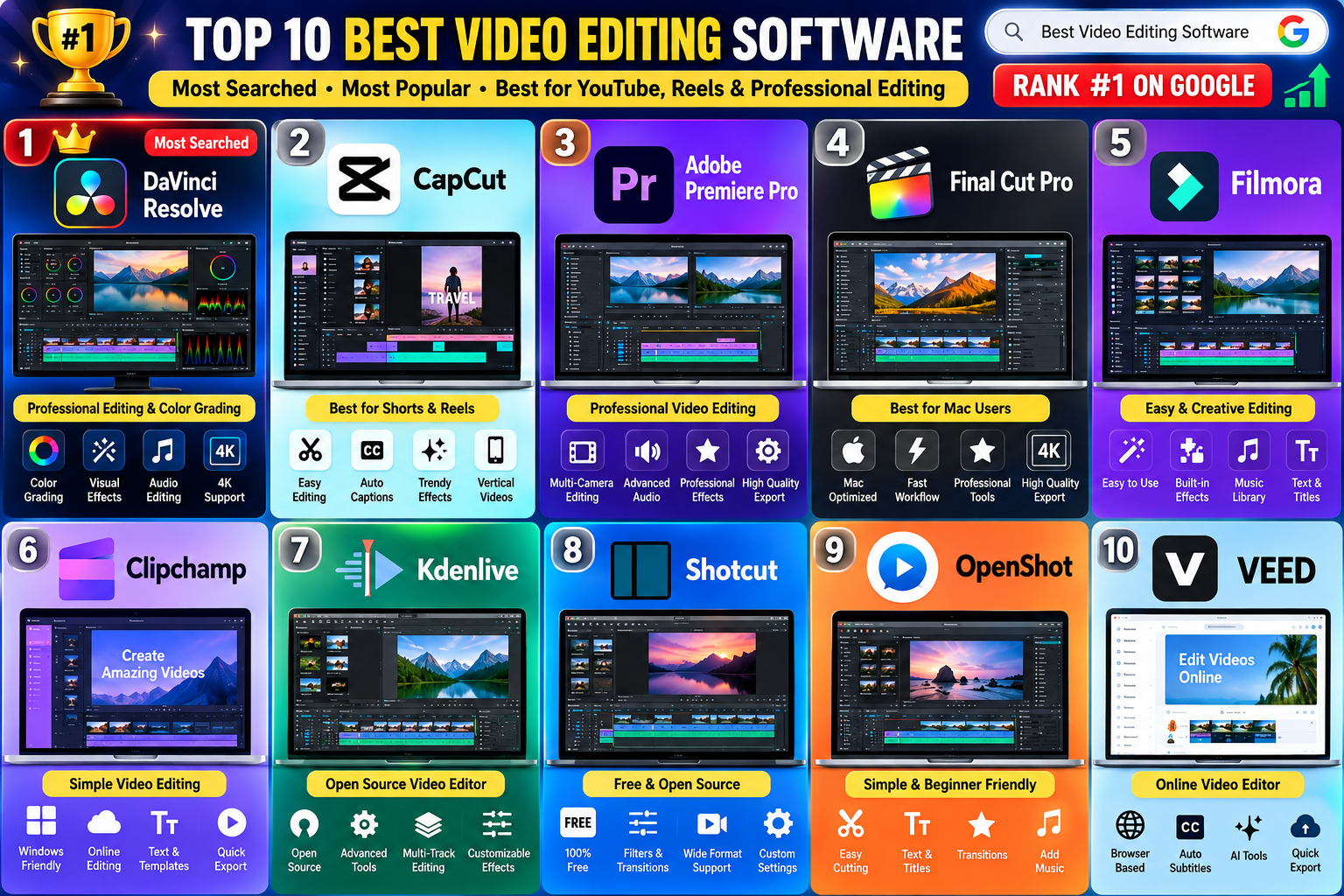
Popular options mein DaVinci Resolve, CapCut, Adobe Premiere Pro, Final Cut Pro, Filmora, Clipchamp, Kdenlive aur Shotcut shamil hain.
· best video editing software 2026
· best free video editing software
· free video editing software
· best video editor for PC
· video editing software for Windows
· best video editing software for YouTube
· free video editor without watermark
· best video editing app
· CapCut vs DaVinci Resolve
· Adobe Premiere Pro
· DaVinci Resolve
· video editor for beginners
· professional video editing software
· video editing software for YouTube videos
· best video editor for Instagram Reels
· best video editor for Shorts
1. DaVinci Resolve
DaVinci Resolve un users ke liye bana hai jo basic editing ke saath professional-level tools bhi explore karna chahte hain.
Isme video editing ke saath color correction, visual effects, motion graphics aur audio post-production ke liye alag capabilities milti hain.
DaVinci Resolve Kis Ke Liye Useful Hai?
- Professional video editing
- YouTube videos
- Cinematic projects
- Wedding films
- Color grading
- Advanced audio editing
- Visual effects
- Long-form content
Iska free version bhi available hai, isliye beginners advanced editing seekhne ke liye ise explore kar sakte hain.
2. CapCut
CapCut fast content creation ke liye popular video editor hai.
Agar aapka main focus YouTube Shorts, Instagram Reels aur social media videos hai, to iska relatively simple workflow useful ho sakta hai.
CapCut Mein Aap Kya Kar Sakte Hain?
- Video trimming
- Text add karna
- Captions banana
- Music add karna
- Transitions
- Video effects
- Speed adjustment
- Vertical videos
- Short-form content editing
Beginners ke liye simple editing projects se start karne ka yeh ek practical option ho sakta hai.
3. Adobe Premiere Pro
Adobe Premiere Pro professional video production ke liye widely used editing software hai.
Agar aap YouTube channels, advertisements, wedding films, documentaries ya professional projects ke liye editing karna chahte hain, to Premiere Pro ka workflow useful ho sakta hai.
Premiere Pro Ke Important Features
- Advanced timeline editing
- Multi-camera editing
- Audio editing
- Color adjustment
- Video effects
- Professional project management
- High-resolution video workflows
Adobe ecosystem ke doosre creative applications ke saath kaam karne wale editors ke liye bhi iska workflow useful ho sakta hai.
4. Final Cut Pro
Mac users ke liye Final Cut Pro ek professional video editing option hai.
Ye particularly un creators ke liye useful ho sakta hai jo Apple computer par high-quality video projects edit karte hain.
Iska interface professional editing ke saath fast workflow ko support karta hai.
5. Filmora
Filmora beginners ko dhyan mein rakhkar banaya gaya video editing software hai.
Agar aapko professional software ki complexity ke bina videos edit karna pasand hai, to Filmora ko consider kiya ja sakta hai.
Ye YouTube videos, social media content aur basic creative projects ke liye useful ho sakta hai.
6. Clipchamp
Clipchamp simple video editing ke liye useful option hai.
Beginners iska use basic videos create karne, clips arrange karne, text add karne aur simple projects export karne ke liye kar sakte hain.
Windows users ke liye ye especially convenient ho sakta hai.
7. Kdenlive
Kdenlive open-source video editor hai.
Ye un users ke liye interesting option ho sakta hai jo traditional timeline editing seekhna chahte hain aur proprietary software ke alternatives explore kar rahe hain.
Isme multiple editing tools aur video-processing options available hain.
8. Shotcut
Shotcut ek free aur open-source video editing application hai.
Iska use basic se intermediate editing projects ke liye kiya ja sakta hai.
Aap clips cut kar sakte hain, audio add kar sakte hain, filters apply kar sakte hain aur final video export kar sakte hain.
9. OpenShot
OpenShot beginners ke liye ek simple editing environment provide karta hai.
Agar aap pehli baar video editing start kar rahe hain aur complicated interface se bachna chahte hain, to ye software explore kar sakte hain.
Basic video cutting, text, transitions aur audio jaise kaam is type ke editor mein kiye ja sakte hain.
10. VEED
VEED browser-based video editing workflow par focus karta hai.
Is type ke online editor ka benefit ye hai ki users ko har project ke liye traditional desktop editing setup par depend nahi karna padta.
Social media content, captions aur quick video projects ke liye online editing tools useful ho sakte hain.
Best Free Video Editing Software
Agar aap paid software purchase nahi karna chahte hain, to free options se editing start kar sakte hain.
DaVinci Resolve, Kdenlive, Shotcut aur OpenShot jaise editors free editing workflows ke liye explore kiye ja sakte hain.
Lekin software choose karne se pehle current free-plan conditions check karna important hai. Kuch applications mein free aur paid versions ke features alag ho sakte hain.
Free Video Editor Without Watermark
“Free video editor without watermark” ek common search requirement hai, lekin har software ke free version ki conditions alag hoti hain.
Isliye software install karne se pehle export settings check karein.
Aapko ye bhi dekhna chahiye:
- Export resolution
- Watermark policy
- Available formats
- Maximum project length
- Premium effects
- AI features
- Export limitations
Sirf “free” likha hone ki wajah se software ko automatically unlimited free software nahi samajhna chahiye.
Best Video Editing Software for YouTube
YouTube ke liye software choose karte waqt sabse pehle apne video ka format dekhein.
YouTube Shorts
Short videos ke liye fast editing, captions, vertical format aur quick effects useful hote hain.
CapCut jaise editors is workflow ko simple bana sakte hain.
Long YouTube Videos
Long-form videos mein detailed cutting, audio editing, color correction aur multiple video tracks ki requirement ho sakti hai.
Is situation mein DaVinci Resolve aur Adobe Premiere Pro jaise advanced editors useful options ho sakte hain.
Beginner YouTube Creator
Agar aap bilkul new hain, to pehle simple editor se editing fundamentals seekhna better approach ho sakta hai.
Baad mein aap advanced professional software par move kar sakte hain.
Best Video Editor for Shorts and Reels
Short-form content ke liye 9:16 vertical editing bahut important hai.
Ek useful Shorts/Reels editor mein ye features helpful ho sakte hain:
- Vertical video support
- Text animation
- Captions
- Music
- Sound effects
- Speed controls
- Transitions
- Video effects
- Quick export
Agar aap daily short-form content banate hain, to fast workflow wala editor aapka editing time reduce kar sakta hai.
Best Video Editing Software for Beginners
Beginners ko software choose karte waqt sirf features ki quantity nahi dekhni chahiye.
Start mein ye basic functions seekhna zyada important hai:
- Video import karna
- Clip cut karna
- Unwanted portion remove karna
- Music add karna
- Text add karna
- Audio level adjust karna
- Transition use karna
- Final video export karna
In fundamentals ko samajhne ke baad advanced editing tools seekhna comparatively easier ho jata hai.
Video Editing Software Choose Karne Se Pehle 5 Questions
1. Aap Kis Type Ka Video Banate Hain?
YouTube, Shorts, Reels, wedding videos aur cinematic films ki requirements alag ho sakti hain.
2. Aapke Computer Ki Specification Kya Hai?
Advanced editing software ke liye powerful processor, sufficient RAM, storage aur compatible graphics hardware ki zarurat ho sakti hai.
3. Aap Beginner Hain Ya Experienced?
Beginner users ke liye simple interface useful hota hai, jabki experienced editors advanced controls prefer kar sakte hain.
4. Kya Aapko Color Grading Chahiye?
Cinematic ya professional projects ke liye detailed color correction aur grading tools important ho sakte hain.
5. Kya Aapko AI Editing Features Chahiye?
AI-based tools captions, transcription, background removal aur repetitive editing tasks mein time save kar sakte hain.
Frequently Asked Questions
2026 Mein Best Video Editing Software Kaun Sa Hai?
Iska answer aapke editing requirements par depend karta hai. Different users ke liye different software suitable ho sakte hain.
Best Free Video Editing Software Kaun Sa Hai?
DaVinci Resolve, Kdenlive, Shotcut aur OpenShot jaise options free editing ke liye explore kiye ja sakte hain. Free version ki current limitations zaroor check karein.
YouTube Ke Liye Kaunsa Video Editor Use Karein?
Long-form YouTube content ke liye advanced editors useful ho sakte hain, jabki Shorts ke liye fast vertical editing workflow zyada convenient ho sakta hai.
Beginners Ke Liye Kaunsa Video Editor Achha Hai?
Beginners ko simple interface aur basic editing tools wala software choose karna chahiye. CapCut, Clipchamp aur OpenShot jaise options se basic editing practice ki ja sakti hai.
Shorts Ke Liye Kaunsa Video Editor Use Karein?
Shorts banate waqt 9:16 format, captions, text, music aur fast editing features important hote hain. Aisa software choose karein jo ye workflow easily support karta ho.
Kya Free Video Editor Professional Videos Bana Sakta Hai?
Software ke free hone ka matlab ye nahi ki usse professional-looking video nahi ban sakti. Final quality editing skills, footage, audio, lighting, storytelling aur export settings par bhi depend karti hai.
Conclusion
Best video editing software choose karne ka sabse simple method hai apni requirement ko pehle identify karna.
Shorts aur Reels banane wale creators ko fast workflow ki zarurat ho sakti hai.
YouTube creators ko timeline, audio aur color tools ki requirement ho sakti hai.
Professional editors ko advanced editing, color grading, visual effects aur audio production capabilities ki zarurat ho sakti hai.
Isliye software choose karte waqt sirf popularity ke basis par decision na lein. Apne content type, computer, experience, budget aur required features ko compare karke editor select karein.
- best video editing software 2026
- best free video editing software
- free video editing software
- best video editor for PC
- best video editor for Windows
- best video editing software for YouTube
- free video editor without watermark
- best video editor for beginners
- best video editor for Shorts
- best video editor for Instagram Reels
- professional video editing software
- video editing software for YouTube
- video editing software for PC
- free video editor for PC
- best editing software for YouTube videos
Best Video Editing Software 2026: 10 Best Free & Professional Video Editors
Ye title “Best Video Editing Software” ko beginning mein rakhta hai aur “2026”, “Best Free”, “Professional Video Editors” jaise related search intent bhi cover karta hai.
- Best Video Editing Software 2026: 10 Best Free & Professional Video Editors
- Best Video Editing Software 2026: Top Free Video Editors for PC & YouTube
- Best Video Editing Software 2026: Free Video Editors Without Watermark
- Best Video Editing Software for PC 2026: Free & Professional Editors
- Best Free Video Editing Software 2026: Top Editors for YouTube, Reels & Shorts
Main #1 title use karne ki salah dunga, kyunki ye aapke existing article ke topic ko sabse naturally match karta hai.
Best Video Editing Software
- best video editing software 2026
- best free video editing software
- best video editing software for PC
- best video editor for YouTube
- free video editor without watermark
- best video editor for beginners
- best video editor for Windows
- best video editor for Shorts
- best video editor for Reels
- professional video editing software